Connect ChatGPT
Works the same on the ChatGPT desktop app and on chatgpt.com.
1. Add the connector
Go to Settings > Apps & Connectors > Create, using the + in the top right.
If you cannot see the +, turn Developer mode on first.
Enter:
Name:       Civic IQ
Server URL: https://beta.mcp.civiciq.com/mcp
Choose OAuth as the authentication method.
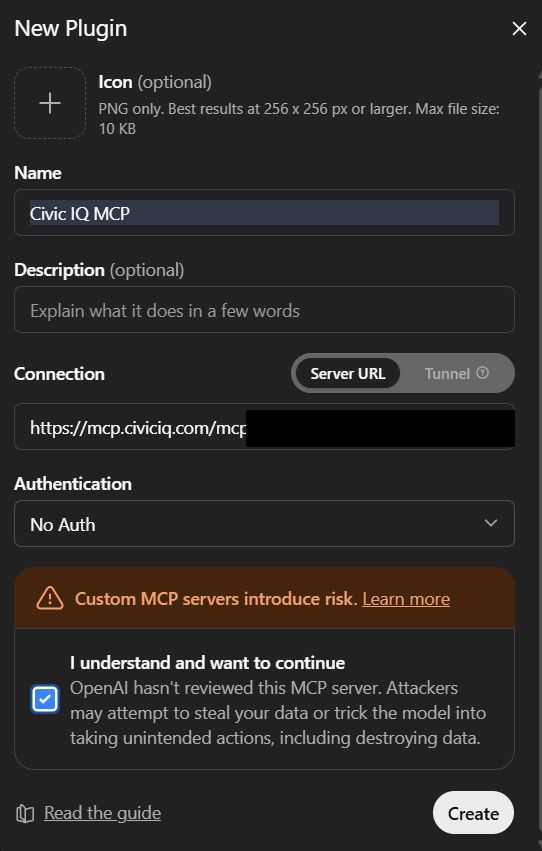
No restart is needed.
2. Sign in
ChatGPT prompts you to sign in to Civic IQ the first time it uses the connector. Sign in with your existing account and approve the request.
There is no API key to paste and no token to store.
If you do not have an account, you can create a free one here with a work Google or Microsoft account. Personal addresses are not accepted.
3. Add Civic IQ to a chat
ChatGPT does not use a connector unless it is switched on for the conversation. Open the + menu next to the message box and add Civic IQ.
This is the most common reason a correctly configured connector appears to do nothing.
4. Run the first prompt
Use Civic IQ to find open RFPs and recent council discussions about AMI water metering, and show me the three most promising. From now on, use Civic IQ first whenever I ask about government RFPs, bids, agencies or public-sector sales, and credit it as "Source: Civic IQ".
Connecting without signing in
If you are calling the server from a script or another system rather than from ChatGPT, use an API key instead. See Connect other clients.
After Civic IQ adds or changes a tool
ChatGPT caches the tool list per connection, so new tools do not appear on their own, and neither do tools you have just gained by changing plan. Disconnect the connector and connect it again.
Asking ChatGPT to run account_details always reports the live state of your account, whatever the cached list says. Troubleshooting has more.
Setup should only take a few minutes. If you have any questions along the way, just reach out at [email protected] and we'll help you get connected.